News
FAQ Search icon_logout FAQ View
 
Subject : 
Use Keyboard/Mouse of PC to Control and Play PS4
 
Description : 


How can I control both a PC and PS4 with the same keyboard
and mouse?


Solution : 

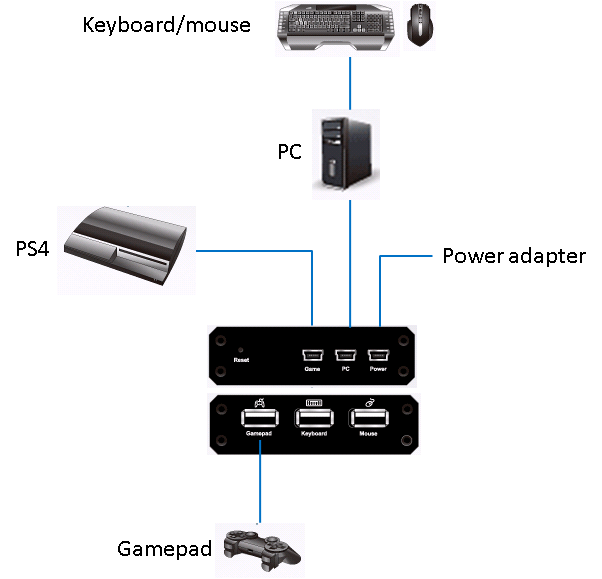
Connect the  mouse and keyboard to UC410 and the UC410 to the PC as the below figure.


Using the Phantom software select Play mode to control the PS4


Please refer to the video for using the play mode.


Related FAQ : 
How do I use UC232A for controlling a device on Mac?
How to proceed manual pairing
Saving EDID to VC010
Install and watch an Onvif IP camera on VK2100
Use virtual media feature remote install OS for client PC
 

Was this information helpful? Y   N  
Any commend for this FAQ? 
Thank you for your valueable comment!!!!
 
If you need more assistance, please click the button on the right (Ask Question) and one of our experts will help you




