Home
Log In
Language:
简体中文
繁體中文
English
日本語(日本)
한국어(대한민국)
Deutsch
Français
Italiano
Português
Español
русский
News
FAQ Search
FAQ View
Subject :
遠端關機模式
Description :
我嘗試使用ViewPower軟體上的遠端關機功能(remote shutdown),但並沒有成功,請問如何設定?
Solution :
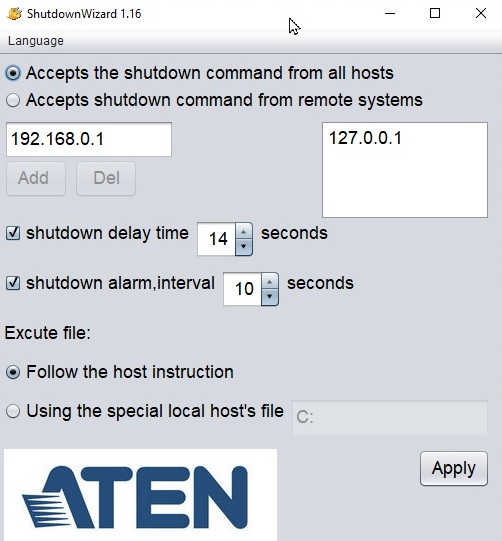
要在使用電池模式的狀況下關掉連接在UPS outlet上的被控PC,你需要安裝shutdown wizard這個小程式,並將PC連接網路。
之後用ViewPower選擇遠端關機功能(remote shutdown)並設定在電池模式下多少會觸發遠端關機功能。
當然你也可以在設定中設定遠端關機的控制是所有控制端(Host)都可以還是只有特定IP的控制端(Host)。
注意:灌ViewPower的PC跟被控PC需要在同一網段或可以連到的網路環境下。
Related FAQ :
스카이 레이크 또는 카비 레이크 식별
포트에서 VS1504 캐스케이드 거리
更改 ES0152 设定
After switching ports with hotkey, CS1768/CS1788 gets stuck and a black screen appears
Android App License
Was this information helpful?
Y
N
Any commend for this FAQ?
Submit Comment
Thank you for your valueable comment!!!!
If you need more assistance, please click the button on the right (Ask Question) and one of our experts will help you
Ask Question
Account
Membership Function
Log In
Create New
Support Center
Technical Support
FAQ
Ask Question
ATEN Hotkey List
3rd-Party Device Compatible List
Service Support
Warranty Policy
Repair Query
Product Registration
Product Information
Windows Compatible Product List
Discontinued Products
Downloads
|
eService System FAQ
|
© ATEN INTERNATIONAL Co., Ltd. All rights reserved.






 FAQ Search
 FAQ View




